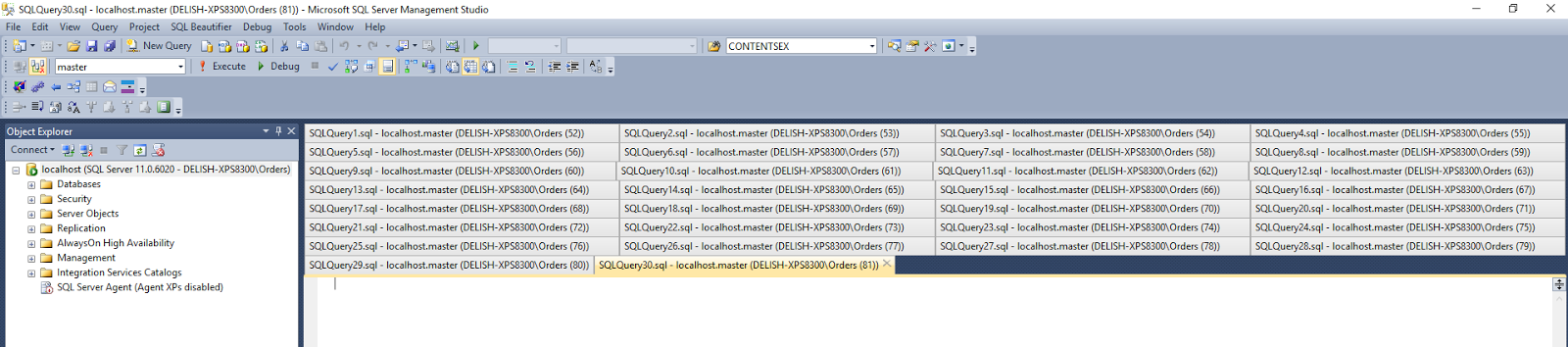
For a long time I felt like a crazy person for constantly closing documents in SSMS just because I could not easily access the documents that no longer had a visible tab. I would find myself resizing Object Explorer, maximizing SSMS, etc. to be able to see all the tabs. I'm sure I'm not the only one. In fact, Sergey Vlasov has created a Visual Studio plugin to deal with exactly this. Since SSMS is built on top of Visual Studio, the plugin works for those that also work exclusively in SSMS.
Visual Studio Gallery Link
Thank you Sergey!
SELECT [tips tricks and commentary] FROM [my experiences] WHERE subject IN ('database', 'data warehouse', 'business intelligence')
Showing posts with label Microsoft SQL Server. Show all posts
Tuesday, May 31, 2016
Thursday, January 14, 2010
Derived Table, Subquery, Correlated Subquery, etc.
I was recently attempting to explain to someone the difference between derived tables and subqueries. I didn't do a great job and came to the conclusion that I wasn't completely clear on the terminology. I don't like not knowing things so I did a little research and this is what I found . . .
A derived table is not what I thought it was. I always referred to a derived table as being a query in a FROM clause. For example:
SELECT
id AS EmployeeId,
name AS EmployeeFullName,
COUNT(*) AS PaychecksIssuedCount
FROM
(SELECT
id,
name
FROM
employee
WHERE
employee_type_cd = 101) emp
INNER JOIN paycheck ps
on emp.id = ps.emp_id
Apparently this is actually called a subquery and can be referred to as a subquery in a FROM clause. It's a bit of symantics but a derived table is actually the result of a table subquery.
For some reason people that use SQL Server (like me) tend to refer to this as a derived table. I guess I'll have to stop doing that now.
As for correlated subqueries, these can be found in the list of projected columns as well as the WHERE and HAVING clauses. For example:
SELECT
id,
name
FROM
employee emp
WHERE
years_employed =
(SELECT
AVG(years_employed)
FROM
employee emp_avg_years
WHERE
emp_avg_years.business_unit = emp.business_unit)
As you can see, the subquery has a WHERE clause that refers (correlates) to the outer/parent query.
So there you have it. Stop saying derived tables! Most likely you're misusing it the way I have ever since I learned about the concept (of subqueries - not derived tables ;)). Or maybe you're not as anal as I am. However, if you've read this far I'd say you are.
A derived table is not what I thought it was. I always referred to a derived table as being a query in a FROM clause. For example:
SELECT
id AS EmployeeId,
name AS EmployeeFullName,
COUNT(*) AS PaychecksIssuedCount
FROM
(SELECT
id,
name
FROM
employee
WHERE
employee_type_cd = 101) emp
INNER JOIN paycheck ps
on emp.id = ps.emp_id
Apparently this is actually called a subquery and can be referred to as a subquery in a FROM clause. It's a bit of symantics but a derived table is actually the result of a table subquery.
For some reason people that use SQL Server (like me) tend to refer to this as a derived table. I guess I'll have to stop doing that now.
As for correlated subqueries, these can be found in the list of projected columns as well as the WHERE and HAVING clauses. For example:
SELECT
id,
name
FROM
employee emp
WHERE
years_employed =
(SELECT
AVG(years_employed)
FROM
employee emp_avg_years
WHERE
emp_avg_years.business_unit = emp.business_unit)
As you can see, the subquery has a WHERE clause that refers (correlates) to the outer/parent query.
So there you have it. Stop saying derived tables! Most likely you're misusing it the way I have ever since I learned about the concept (of subqueries - not derived tables ;)). Or maybe you're not as anal as I am. However, if you've read this far I'd say you are.
Monday, December 7, 2009
Cognos 8.3 and SSAS 2005 - Not So Good
It's a rare day that I concede defeat but today was one of those rare days. I threw in the towel on migrating existing Cognos Report Studio reports from a Framework Manager model that used a SQL Server relational data source to a new model based on a SQL Server Analysis Services 2005 data source.
There were two major reasons:
1. The inability to make any modifications to a Framework Manager model using objects from the SSAS cubes. This includes the creation of filters based on an SSAS cube.
2. Performance issues related to this architecture.
Let me explain why I am using a hybrid (Microsoft/Cognos) architecture . . .
A couple of years ago I took on a job to create a reporting solution for a large CRM implementation at a financial services firm. What I found was that the CRM solution that they were having customized had a plug-in module for Cognos-based "analytics". What this meant was that they had a Cognos model built on top of their OLTP system and some reports to go with it. Additionally, they provided an authentication module that allowed for users that were authenticated on the CRM system (using a combination of AD and forms based login) to have their credentials passed on to this CRM application. This was important because some of the users were on a different domain and were not able to authenticate using AD. I tried to sell them on creating a custom authentication provider for SSRS and scrap Cognos. Not because I refuse to work with non-Microsoft technology but because Cognos didn't seem like the right solution for the problem (I won't get into that here).
I couldn't sell them so I proceeded to build Cognos reports using Report Studio, against a Framework Manager model that was on top of the live OLTP database. The OLTP schema was complex, the model was buggy and full of gaps. It was not pretty. In the end we had 30+ reports. Some of which were very complex and written against a very complex and cumbersome model. The queries being produced by Cognos were unbelievably complex and at times rather difficult to tune and troubleshoot.
Fast forward a couple of years and the maker of the CRM software is now using SQL Server as their reporting and analytics platform and my client is struggling with supporting their existing Cognos implementation as they don't quite have the expertise to extend (modify existing and create new reports) or tune their solution and they would like to incorporate cubes.
Initially I thought I would build them a data mart. From that I would create a relational Cognos model as well as build out an SSAS database and cube(s). Then I thought, wouldn't it be great if I could simply build the cubes and have Framework Manager, Report Studio, and Analysis Studio use the cube(s) instead of having to maintain both the cubes and the relational model.
I got as far as building the mart, ETL, configuring an SSAS 2005 data source and creating a model on the SSAS cube. Then I began to port the existing reports. Well these reports used some filters in complex filters. I attempted to recreate these filters in the new model. No can do. It simply isn't supported. Then I started playing around with basic reports using the new model. At times the report was unresponsive. I then began looking around the message boards only to find that there were quite a number of people attempting to resolve performance issues with Cognos 8.3 and Analysis Services cubes with no positive responses. This was the point at which I threw in the towel.
So tomorrow I move on. I have some nice cubes created that will be used with Excel 2007 and hopefully a little bit with Analysis Studio for those that can't authenticate using AD. But, I'll have to define a relational model for the report conversion process.
An alternative would be to implement SSRS and recreate all the reports as well as create a custom authentication extension but that would be too costly at this time. Another alternative would be to create Cognos Transformer cubes but the client does not have a license for this product and do not want to pay for it, nor do they have the expertise to support it.
It's not an ideal solution (a relational FM model and AS cubes) and will require additional maintenance (two metadata models) but it will provide a much higher performing system with analytics capabilities and a much simpler and higher performing model from which to write reports.
There were two major reasons:
1. The inability to make any modifications to a Framework Manager model using objects from the SSAS cubes. This includes the creation of filters based on an SSAS cube.
2. Performance issues related to this architecture.
Let me explain why I am using a hybrid (Microsoft/Cognos) architecture . . .
A couple of years ago I took on a job to create a reporting solution for a large CRM implementation at a financial services firm. What I found was that the CRM solution that they were having customized had a plug-in module for Cognos-based "analytics". What this meant was that they had a Cognos model built on top of their OLTP system and some reports to go with it. Additionally, they provided an authentication module that allowed for users that were authenticated on the CRM system (using a combination of AD and forms based login) to have their credentials passed on to this CRM application. This was important because some of the users were on a different domain and were not able to authenticate using AD. I tried to sell them on creating a custom authentication provider for SSRS and scrap Cognos. Not because I refuse to work with non-Microsoft technology but because Cognos didn't seem like the right solution for the problem (I won't get into that here).
I couldn't sell them so I proceeded to build Cognos reports using Report Studio, against a Framework Manager model that was on top of the live OLTP database. The OLTP schema was complex, the model was buggy and full of gaps. It was not pretty. In the end we had 30+ reports. Some of which were very complex and written against a very complex and cumbersome model. The queries being produced by Cognos were unbelievably complex and at times rather difficult to tune and troubleshoot.
Fast forward a couple of years and the maker of the CRM software is now using SQL Server as their reporting and analytics platform and my client is struggling with supporting their existing Cognos implementation as they don't quite have the expertise to extend (modify existing and create new reports) or tune their solution and they would like to incorporate cubes.
Initially I thought I would build them a data mart. From that I would create a relational Cognos model as well as build out an SSAS database and cube(s). Then I thought, wouldn't it be great if I could simply build the cubes and have Framework Manager, Report Studio, and Analysis Studio use the cube(s) instead of having to maintain both the cubes and the relational model.
I got as far as building the mart, ETL, configuring an SSAS 2005 data source and creating a model on the SSAS cube. Then I began to port the existing reports. Well these reports used some filters in complex filters. I attempted to recreate these filters in the new model. No can do. It simply isn't supported. Then I started playing around with basic reports using the new model. At times the report was unresponsive. I then began looking around the message boards only to find that there were quite a number of people attempting to resolve performance issues with Cognos 8.3 and Analysis Services cubes with no positive responses. This was the point at which I threw in the towel.
So tomorrow I move on. I have some nice cubes created that will be used with Excel 2007 and hopefully a little bit with Analysis Studio for those that can't authenticate using AD. But, I'll have to define a relational model for the report conversion process.
An alternative would be to implement SSRS and recreate all the reports as well as create a custom authentication extension but that would be too costly at this time. Another alternative would be to create Cognos Transformer cubes but the client does not have a license for this product and do not want to pay for it, nor do they have the expertise to support it.
It's not an ideal solution (a relational FM model and AS cubes) and will require additional maintenance (two metadata models) but it will provide a much higher performing system with analytics capabilities and a much simpler and higher performing model from which to write reports.
Friday, December 4, 2009
Is Everything OK?
One of my biggest gripes is related to where to look when there seems to be an issue with a BI solution that uses SSIS, SSAS, and SSRS. And what if you just want to know if things have been humming along. We can implement all the email notifications in the world but what if your email system is unreliable (as it was with a recent client). Hence the question, "Is everything OK?"
I'm pretty well versed in exception handling and logging and can probably set my brain to autopilot and find an error message in a log on one of 10 servers without actually thinking about it but what about everyone else? There are other stakeholders such as more junior developers or even senior level people that are unfamiliar with SQL Server. How about the business? An analyst might see something fishy in the data and want to know if last night's load was successful. Do they have to call me or someone else on the development team? In many cases yes. But why? That kind of a dependency is unhealthy.
That's where the SQL Server BI Health Monitor Dashboard comes in. The SQL Server Health what? Don't fret if you haven't heard of this. I'd be suprised, no maybe disturbed, if you had. The SQL Server Health Monitor Dashboard was something I recently put together for a client that was unable to obtain a seasoned SQL Server BI developer but needed to continue to support the solution I built for them without having to rely on getting a hold of me.
The dashboard uses all out-of-the-box data sources including some system tables, the SSIS log table created by the SQL Server log provider, and the SSRS tables found in the ReportServer database to tie together a majority of the data needed to determine where in the SQL Server BI ecosystem your problem lives thus helping fix the problem that much faster.
I've posted the source code on Codeplex. You can find it @ http://bihealthdashboard.codeplex.com/. It's not exactly plug and play at this point. Connection strings need to be modifed and you might have to create the DimDate table if you don't already have a table of dates accessible. It's also geared towards a BI solution that has a single SQL Server Agent job step that calls a master SSIS package that in turn calls all other SSIS packages and a single SQL Server Agent job step that process your SSAS database. If that doesn't sound like your system, the solution can still be valuable in that it shows you how to extract very useful process metadata from your SQL Server BI Solution.
Which leads me to my next endeavor -> The SQL Server Metadata Manager . . .
Monday, August 24, 2009
Great Book for Building a SQL Server BI Solution

While written for SQL Server 2005 and a little out of date for SQL Server 2008, The Microsoft Data Warehouse Toolkit: With SQL Server2005 and the Microsoft Business Intelligence Toolset is a must read for anyone looking to learn and/or apply the Kimball methodology of dimensional modeling while using the Microsoft SQL Server BI stack (SSIS, SSRS, SSAS).
The book starts by describing what the Kimball group has determined to be the best way to execute the requirements gathering phase, it then moves on to designing the dimensional model including the physical relational data warehouse, creating the ETL infrastructure (SSIS), an OLAP database (SSAS), creating standard reports (SSRS), dealing with partitioning, security, maintenance, etc.
Someone with a few years of SQL Server experience can build a full-blown, mid-sized BI solution with this book alone.
The book also has a great, although not physically attractive, companion website. Check out the tools section for some invaluable tools including a dimensional modeling spreadsheet that is perfect for the first few iterations of the relational data warehouse. While not extremely fancy it will generate quality "create" scripts for the initial development phase of your project.
Subscribe to:
Posts (Atom)