Thursday, April 26, 2018

Continuous Integration (CI) with Azure DevOps, SSIS, and SQL Server Database Projects

What are we doing here?

This is the first part of a two-part series covering 1) CI (continuous integration/build) and 2) CD (continuous deployment/release) for Visual Studio SQL Server Database and Integration Services project types on the VSTS (Visual Studio Team Services) platform.

Some background

The Visual Studio business intelligence (SSIS, SSRS, SSAS) and database projects types have long been the red headed step child of the Visual Studio ecosystem. Huge strides have been made in recent years but there are still some impediments, one of which is creating CI/CD pipelines in Visual Studio Team Services.

Don't fret

While it's not as straightforward as say a ASP.NET web application, with just a little finessing it's not overly difficult to build and deploy SQL Server Database and Integration Services project types. If you're familiar with creating VSTS build and release definitions it probably wouldn't take you too long to get it figured out. If you are new to this functionality it can definitely be a bit overwhelming. Hence, this step-by-step guide to standing up a basic VSTS build definition that includes both database and SSIS projects.

Assumptions (you know what they say...)

The following steps assume that 1) you have a VSTS account 2) a VSTS collection, 2) a VSTS project within the collection and 3) have a source control repository in VSTS Git, TFVC, GitHub, Subversion, Bitbucket Cloud, or Git (not necessarily hosted by VSTS).


This walk through will use an open source project called SSISProjectWeaver that is hosted on GitHub (using a different repository type requires little, if any changes). It's not necessary to know the details of the SSISProjectWeaver project other than that it contains a SQL Server Database project and two Integration Services projects.

<plug>If you're starting a new SSIS project it's worth checking out SSISProjectWeaver as it's a 100% non-invasive ETL framework that provides metadata-driven parallelism and dependencies between any two packages or groups of packages, extensive logging, reporting and dashboarding, alerting, and a bunch more. It's easy to set up and has been proven in large organizations with hundreds of packages running a day. You don't have to modify your existing code and if you don't like it you just stop using it. Nothing will have to change with your existing packages.</plug>

Let's do it

  1. Open you VSTS project and click on the Build and Release tab.
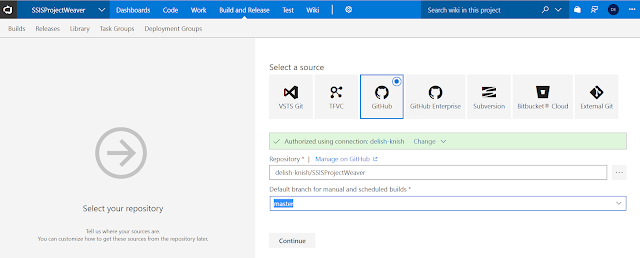
  2. Choose your source. For this example we are going to use GitHub.
  3. Once you've connected to the repository, select the branch that you want to build and click Continue.
  4. In the top right-hand corner under Select a template, click Empty Process. This will start us off with a blank build definition.
  5. Name your build definition appropriately and then choose the Agent queue. In this example we are using a Hosted VS2017 queue. Depending on your project you might want to use a local/on-premise build agent of VS2015. It all depends on your project types, versions, dependencies, etc.
  6. Before we define our build tasks let's create some variables. Click on the Variables tab and create the BuildConfiguration and BuildPlatform variables along with their corresponding default values.
  7. Navigate back to the Tasks tab and click the next to Phase 1. Search for and choose the Visual Studio Build task. This task will use the out-of-the-box msbuild template for building SQL Server database projects with a .dacpac as the build output.
  8. Change the Display name to something meaningful.
  9. Choose the SQL Server database project or solution to build.
  10. Choose the version to build.
  11. Use the newly created variables for the Platform and Configuration properties.
  12. Save the task.
  13. Navigate back to the Tasks tab and click the + next to Phase 1. Search for and choose the Command Line task. We will use this task as a workaround to a lack of an msbuild template for SSIS projects by calling invoking devenv to build the projects.
  14. Change the version to 2.*(preview). This version allows multi-line commands similar to a .bat file.
  15. Change the Display name to something meaningful.
  16. Enter the following text into the Script box. The first 8 lines just echo (print line) info that is useful for debugging. The last line is the actual command that is being executed.
    echo BuildShare: $(BuildShare)
    echo Agent.BuildDirectory: $(Agent.BuildDirectory)
    echo Build.SourcesDirectory: $(Build.SourcesDirectory)
    echo Build.ArtifactStagingDirectory: $(Build.ArtifactStagingDirectory)
    echo System.DefaultWorkingDirectory: $(System.DefaultWorkingDirectory)
    echo BuildConfiguration: $(BuildConfiguration)
    echo BuildPlatform: $(BuildPlatform)
    echo Command: "C:\Program Files (x86)\Microsoft Visual Studio\2017\Enterprise\Common7\IDE\Devenv.com" "$(Build.SourcesDirectory)\your_project_or_solution_name.(sln|proj)" /build $(BuildConfiguration)

    "C:\Program Files (x86)\Microsoft Visual Studio\2017\Enterprise\Common7\IDE\Devenv.com" "$(Build.SourcesDirectory)\your_project_or_solution_name.(sln|proj)" /build $(BuildConfiguration
  17. Save the task.
  18. Click on the Triggers tab and enable continuous integration. This will enable VSTS to execute this build definition each time code is committed to your source control repository.
  19. Test the build definition by clicking on Queue.
  20. Assuming your build was successful, you now have the CI half of your CI/CD pipeline and can auto-notify the world when one of your co-workers breaks the build!

Wrap Up

When it comes to technology, nothing is ever as simple as it appears. The SSISProjectWeaver solution is pretty straightforward in terms of code and dependencies. It's T-SQL and SSIS packages with no external dependencies. Building it is is very straightforward as you can see above. However, many projects are much more complex and require more complex configurations to set up a build definition. For example, the first time I created a build definition with an SSIS project it failed because I had references to 3rd party components. Of course Microsoft doesn't know I am using those components so it's not on their hosted build servers. To make it work I had to give up the convenience of using a hosted build server and stood up my own build server with all the necessary components. Food for thought. Don't be discouraged if you hit a few stumbling blocks on your way to automated build bliss!

Stay tuned for part two which will cover CD (continuous deployment) and will walk you through getting your code deployment automated.

As always, if you have any questions feel free to drop me an email at david@elish.net.

Sunday, March 11, 2018

Estimated Number of Rows = 1 Query Very Slow or Not Returning Data


A query that is slow that should be fast (e.g. underlying tables are not enormous, has been fast in the past, etc. - I'll let you determine what should or should not be fast) is often (but not always) slow because of a "bad" query plan. Determining what is and what is not a good query plan is not something we're going to get into here but if you're at your wits end with a query that has run for hours and should be much faster, there's a good chance you don't have an optimal plan.

If you've landed on this page it's likely that you've already looked at your query plan and seen that some operators are showing Estimated Number of Rows = 1 when you know there are definitely more rows than that.

A key ingredient to a good query plan is accurate cardinality estimation. Cardinality refers to the uniqueness of values contained within a particular column or index and has a strong influence on the SQL Server Query Optimizer. It will drive decisions such as which join operator (e.g. hash match, netsted loops, merge) to use which will significantly impact query performance.

If you're encountering the Estimated Number of Rows = 1 there's a good chance that either your statistics need to be updated and/or the Cardinality Estimator is failing you.

To resolve the issue first trying updating statistics on the table(s) in question. Use the WITH FULLSCAN option to cover your bases.

 UPDATE STATISTICS table_or_indexed_view_name WITH FULLSCAN 
 ALTER DATABASE SCOPED CONFIGURATION CLEAR PROCEDURE_CACHE; 

After you've updated your statistics, take another look at your query plan. Has the Estimated Number of Rows value changed to something more accurate? If so, try running your query again. If not, it might be that you're having issues with the Cardinality Estimator.

The Cardinality Estimator received an overhaul with SQL Server 2014 and while it's better in most cases, it is not in all. In fact, I stumbled upon a bug in the CE just last year that Microsoft acknowleged and fixed. If you suspect the CE is not working as it should be there are still a few things you can try.

First, determine if you're having an issue that someone else has already encountered and that Microsoft has fixed. You can do this by enabling trace flag 4199 which will enable all query optimizer fixes. You can first try this at the query level by using the following option.

 OPTION(QUERYTRACEON 4199)  

If this works and you want to apply this globally, you can execute the following.

 DBCC TRACEON (4199, -1); 
 ALTER DATABASE SCOPED CONFIGURATION CLEAR PROCEDURE_CACHE;   

If you still haven't solved the problem you can have SQL Server use the old or "legacy" CE as they call it. This can be used at the query level using the following hint after your query

 OPTION (USE HINT ( 'FORCE_LEGACY_CARDINALITY_ESTIMATION' ))  

or at the database level using the following script.

 ALTER DATABASE SCOPED CONFIGURATION SET LEGACY_CARDINALITY_ESTIMATION = ON; 
 ALTER DATABASE SCOPED CONFIGURATION CLEAR PROCEDURE_CACHE; 

And if none of that works...
Take a look at your query plan. Do you have Merge Joins that require sorts on large data sets? Are there Nested Loops that are taking forever (try using Live Query Statistics to find your bottlenecks). You can try using join hints to force a HASH join and see if that helps.

I know all too well how painful this type of situation can be. While we were very grateful that Microsoft fixed our problem, it took months to identify it and then months more before it was available in a service pack. Unfortunately for us, using the Legacy CE was not an option. Hopefully for you, one of these fixes will work!

Thursday, March 8, 2018

Visual Studio SQL Server Project (SSDT) OPENQUERY Warning

Using OPENQUERY in a stored procedure in a Visual Studio SQL Server project will result in the following warning.

 SQL70558: The column definition from this OPENQUERY function cannot be verified, and the operations involved with it might not be understood correctly.       

Depending on how your project and build is configured, this warning it may or may not fail the build. Regardless, if you have to use OPENQUERY and don't want the warning, you can use the Suppress TSql Warnings property on the stored procedure. To view this property in Visual Studio, click on the .sql file in the Solution Explorer window. You should now see this property in the last row of the Properties window. Enter the 70558 warning number. The warning should now be suppressed and will no longer appear in the Error window or the build output.

The Suppress TSql Warnings property can be used to suppress other warnings as well. To suppress multiple warnings just delimit them with a comma.

Tuesday, July 12, 2016

Script to Copy Data Between Two SQL Server Databases

I recently had a requirement to "copy" the data between two identical database schemas. Actually the requirement was to "rebuild" a database from the ground up (objects and data). I almost always Visual Studio SQL Server projects (available after installing SSDT as well as with the latest versions of Visual Studio) when doing database development which means I can deploy an "empty" database with more or less the click of a mouse so I won't get into creating the actual database, only populating it. If you need to copy the database objects to a new database there are tools built within SQL Server Management Studio to allow you to do this. You can check out this TechNet post for more information. You can also generate DML or data population scripts from SSMS but it can result in massive files if you have a database with a decent amount of rows. My databases were rather large so I wanted to copy the data from one database to the other without having to explicitly write anything to disk.

This stored procedure handles tables with Identity columns as well as Computed columns. It also only attempts to populate tables that have zero rows. You might have different requirements so feel free to enhance it and post any enhancements that you think would be valuable to others.

CREATE PROCEDURE [dbo].[apUtilCopyDataFromDatabase] @SourceLinkedServerName     VARCHAR(128) = NULL,
                                       @SourceDatabaseName         VARCHAR(128),
                                       @SourceSchemaName           VARCHAR(128),
                                       @SourceTableNamePrefix      VARCHAR(128) = '',
                                       @TargetLinkedServerName     VARCHAR(128) = NULL,
                                       @TargetDatabaseName         VARCHAR(128) = NULL,
                                       @TargetSchemaName           VARCHAR(128) = 'dbo',
                                       @OnlyPopulateEmptyTablesInd BIT = 0
AS
  BEGIN
 SET NOCOUNT ON;
 DECLARE @SQLCursorData       NVARCHAR(MAX),
              @SQLTruncate         VARCHAR(MAX),
              @SQL                 VARCHAR(MAX),
              @TableName           SYSNAME,
              @SchemaName          VARCHAR(MAX),
              @HasIdentity         BIT,
              @CurrentDatabaseName VARCHAR(128) = DB_NAME(),
 @TargetDatabase VARCHAR(128) = @TargetDatabaseName; --ToDo: Cleanup confusing names  

      DECLARE @SQLNoCheck NVARCHAR(4000) = 'USE ' + @TargetDatabase + '; EXEC sp_MSforeachtable @command1 = ''ALTER TABLE ? NOCHECK CONSTRAINT ALL''; USE ' + @CurrentDatabaseName + ';';
 EXEC sp_executesql @SQLNoCheck;

      SET @SourceDatabaseName = IIF(@SourceLinkedServerName IS NOT NULL, QUOTENAME(@SourceLinkedServerName) + '.', '')
                                + QUOTENAME(@SourceDatabaseName) + '.'
                                + QUOTENAME(@SourceSchemaName);

      SET @TargetDatabaseName = IIF(@TargetLinkedServerName IS NOT NULL, QUOTENAME(@TargetLinkedServerName) + '.', '')
                                + IIF(@TargetDatabaseName IS NOT NULL, QUOTENAME(@TargetDatabaseName) + '.', '')
                                + QUOTENAME(@TargetSchemaName)

      SET @SQLCursorData = 'DECLARE TableCursor CURSOR GLOBAL FOR
        SELECT
          s.NAME
          ,t.NAME
        FROM ' + @TargetDatabase + '.sys.tables t
          JOIN ' + @TargetDatabase + '.sys.schemas s
            ON t.schema_id = s.schema_id
          JOIN ' + @TargetDatabase + '.sys.objects AS o
            ON t.object_id = o.object_id
          JOIN ' + @TargetDatabase + '.sys.partitions AS p
            ON o.object_id = p.object_id
        WHERE
          t.type = ''U''
          AND t.NAME LIKE ''' + @SourceTableNamePrefix + '%''
        GROUP  BY
          s.NAME
          ,t.NAME
      HAVING SUM(p.rows) = 0 
OR ' + CAST(@OnlyPopulateEmptyTablesInd AS VARCHAR(1)) + ' = 0;'

      EXEC sp_executesql @SQLCursorData;

      OPEN TableCursor;

      FETCH NEXT FROM TableCursor INTO @SchemaName, @TableName;

      DECLARE @ColumnList VARCHAR(MAX);

      WHILE @@FETCH_STATUS = 0
        BEGIN
            BEGIN TRY
PRINT CHAR(13) + CHAR(10)
                      + '-----------------------'
                      + QUOTENAME(@SchemaName) + '.'
                      + QUOTENAME(@TableName)
                      + '-----------------------'

--ToDo: Add logic to determine if there are FK constraints. TRUNCATE if not, DELETE if there are.
                IF (@OnlyPopulateEmptyTablesInd = 0)
BEGIN
SET @SQLTruncate = 'DELETE FROM '
  + QUOTENAME(@TargetDatabase) + '.'
  + QUOTENAME(@SchemaName) + '.'
  + QUOTENAME(@TableName) + ';';

EXEC(@SQLTruncate);

PRINT CAST(@@ROWCOUNT AS VARCHAR) + ' rows deleted.';
END

                DECLARE @SQLHasIdentity NVARCHAR(1000) = 
'USE ' + @TargetDatabase + '; 
SELECT @val = CAST(SUM(CAST(is_identity AS TINYINT)) AS BIT)
                        FROM ' + @TargetDatabase + '.sys.columns
                        WHERE object_id = OBJECT_ID(QUOTENAME(''' + @SchemaName + ''') + ''.'' + QUOTENAME(''' + @TableName + ''')); 
USE ' + @CurrentDatabaseName + ';';

                EXEC sp_executesql @SQLHasIdentity, N'@val bit OUTPUT', @val = @HasIdentity OUTPUT;

SET @ColumnList = NULL;

                DECLARE @SQLColumnList NVARCHAR(4000) = 
'USE ' + @TargetDatabase + '; 
DECLARE @ColList NVARCHAR(MAX);
SELECT @val = COALESCE(@val + '','', '''') + QUOTENAME(name)
FROM '
 + @TargetDatabase + '.sys.columns
WHERE
 object_id = OBJECT_ID(QUOTENAME(''' + @SchemaName + ''') + ''.'' + QUOTENAME(''' + @TableName + '''))
 AND is_computed = 0 
 AND NAME NOT IN ( ''CreatedDate'', ''CreatedUser'', ''LastUpdatedDate'', ''LastUpdatedUser'' ); 
 USE ' + @CurrentDatabaseName + ';';

                EXECUTE sp_executesql @SQLColumnList, N'@val VARCHAR(MAX) OUTPUT', @val = @ColumnList OUTPUT;                

                SET @SQL = IIF(@HasIdentity = 1, 'SET IDENTITY_INSERT ' + QUOTENAME(@SchemaName) + '.' + QUOTENAME(@TableName) + ' ON;', '')
                           + 'INSERT INTO ' + @TargetDatabaseName + '.'
                           + @TableName + ' (' + @ColumnList + ') SELECT '
                           + @ColumnList + ' FROM '
                           + CONVERT(VARCHAR, @SourceDatabaseName) + '.'
                           + QUOTENAME(@TableName) + ' '
                           + IIF(@HasIdentity = 1, 'SET IDENTITY_INSERT ' + QUOTENAME(@SchemaName) + '.' + QUOTENAME(@TableName) + ' OFF ', '')
                           + ';';

                EXEC(@SQL);

PRINT CAST(@@ROWCOUNT AS VARCHAR) + ' rows inserted.';
            END TRY
            BEGIN CATCH
                PRINT ERROR_MESSAGE();
            END CATCH

            FETCH NEXT FROM TableCursor INTO @SchemaName, @TableName;;
        END

      CLOSE TableCursor;

      DEALLOCATE TableCursor;

 DECLARE @SQLCheck NVARCHAR(4000) = 'USE ' + @TargetDatabase + '; EXEC sp_MSforeachtable @command1 = ''ALTER TABLE ? CHECK CONSTRAINT ALL''; USE ' + @CurrentDatabaseName + ';';
 EXEC sp_executesql @SQLCheck;

      RETURN 0
  END


Tuesday, June 21, 2016

Visual Studio, TFS, Git, & GitHub

For those unfamiliar with TFVC it is one of the two version control engines shipped with Team Foundation Server, available with Visual Studio Team Services, and available on Microsoft's GitHub "rival", CodePlex. Many developers assume TFVC when they refer to using TFS but this assumption went out the window with TFS 2013 when it began shipping with the option to use either TFVC or Git as a version control repository.

There are many sites such as git-scm.com that do a great job a describing Git and what makes it so powerful so I won't get into specifics here but I will say that it excels over most other version control platforms when it comes to large, distributed projects. One such project is the Linux operating system. In fact, it was Linux's creator, Linus Torvalds, that developed Git to support the large, distributed nature of the development of Linux. Even with smaller projects, developers are embracing Git partially due to applications like GitHub that easily allow sharing and collaboration across the globe.

Git does such a great job that Microsoft itself is moving away from TFVC in favor of Git for many of its own projects. It's even hosting many of its public (open source) projects on GitHub including the .NET Core project.

...which brings us to GitHub. GitHub is not Git and Git is not GitHub. Git is a standalone version control application whereas GitHub is a web-based Git repository hosting service. GitHub allows users to create and share Git repositories and interact with them via the GitHub.com website, APIs, command line tools, IDE plugins, etc.

Back to Microsoft and its integrations with Git and GitHub...

1) CodePlex offers a Git version control option (it is the default):

2) TFS and Visual Studio Team Services offer a Git option (also the default option):

3) Visual Studio 2015 provides local Git repository integration as well as
GitHub integration:


If you landed here it's because you spend at least part of your time developing on the Microsoft stack and are interested in Git. If you know and like Git and didn't know if or how it integrated with Microsoft development tools, now you know enough to find the resources you need to get started. If you've only just heard about Git in passing and work with Microsoft development tools, I would urge you to do some research on Git and GitHub prior to starting your next project so that you can make an informed decision as to which version control system to use and if you want to use hosted repository service like GitHub.

Useful Links
  1. Interesting Wired article that gives some history of Git and GitHub
  2. The Register article about Microsoft moving projects to Git
  3. Visual Studio GitHub extension for all version of Visual Studio prior to Visual Studio 2015 Update 1.
  4. posh-git PowerShell Interface Install Overview which is also part of the GitHub Desktop app install
  5. Combining TFVC and Git repos in the same TFS project blog post


Wednesday, June 1, 2016

SQL Server 2016 Release Date

And...it's here! Looks like it was made available 12pm Eastern on June 1st, 2016.


Tuesday, May 31, 2016

Multiple Rows of Tabs/Docs in SSMS

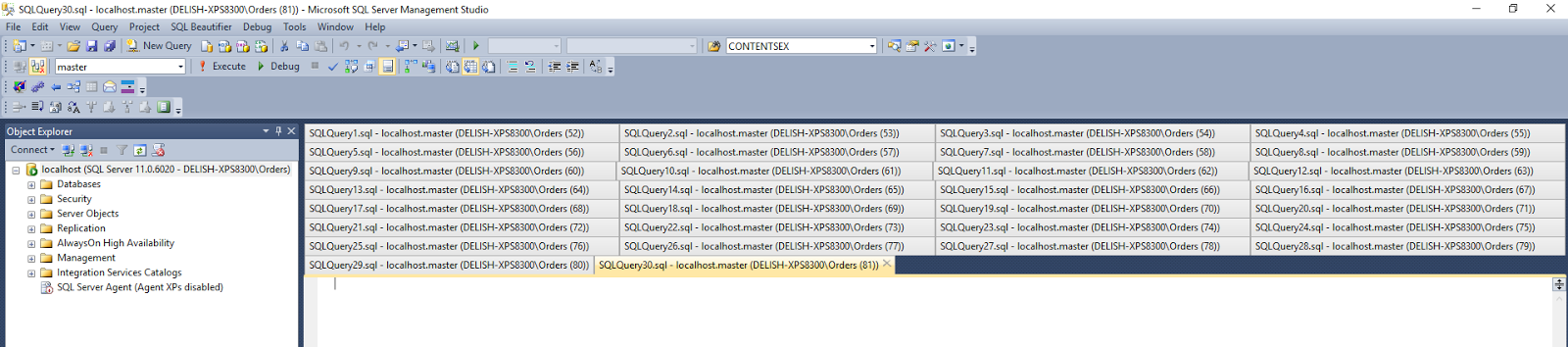
For a long time I felt like a crazy person for constantly closing documents in SSMS just because I could not easily access the documents that no longer had a visible tab. I would find myself resizing Object Explorer, maximizing SSMS, etc. to be able to see all the tabs. I'm sure I'm not the only one. In fact, Sergey Vlasov has created a Visual Studio plugin to deal with exactly this. Since SSMS is built on top of Visual Studio, the plugin works for those that also work exclusively in SSMS.

Visual Studio Gallery Link


Thank you Sergey!